 
|
support :: diary software faqsupport > set up more dictionariesget additional dictionariesChrysanth Diary offers a wide range of dictionary support in many languages, ranging from American English to British English, or French to Afrikaans etc. If you are used to writing diary in a language other than English, chances are that you may find a suitable dictionary to complement the default set of dictionaries that come with the diary software. In addition to that, you may also find some Special Dictionary below, such as a technical dictionary for more specific usages. To download the dictionary that you want, simply right click on the dictionary's URL, and choose "Save Target As..." for Internet Explorer, or "Save Link As..." for Firefox. When the "Save As" dialog comes out, browse to the following folder and click "Save": [ Diary Installation Path ] \ Dictionaries for instance: "C:\Program Files\Chrysanth\Diary\Dictionaries" Additional LanguagesSpecial Dictionary
set up the new dictionaries in the diary softwareNow you are only a few steps away from using the newly added dictionary:
diary options
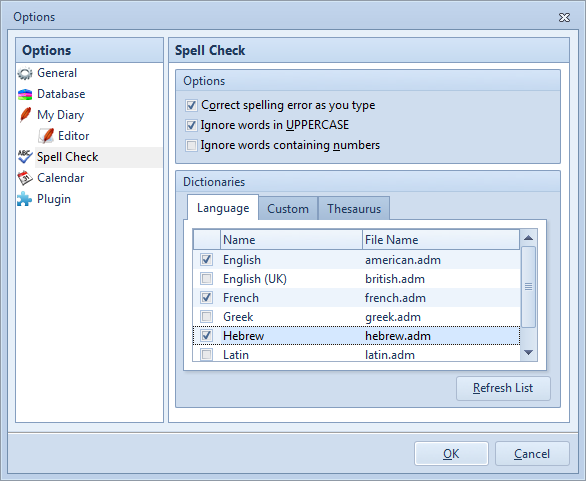
set up a new dictionary
|